
Booking should be
the easy part.
If your therapist sent you a Sessio link, this is what happens next — and what doesn't. Asking for help is hard enough; the rest should take a minute.
- 1
Pick a time that's really free
Your therapist's page shows only open times. No messages back and forth, no waiting for a reply.
- 2
Prepay in seconds
BLIK, card or Przelewy24 on Stripe's secure page. The payment goes to your therapist, not to Sessio.
- 3
Join from the link
The link is in your confirmation and in a reminder the day before. It opens in your browser — nothing to install.
See, move and message — without phoning anyone.
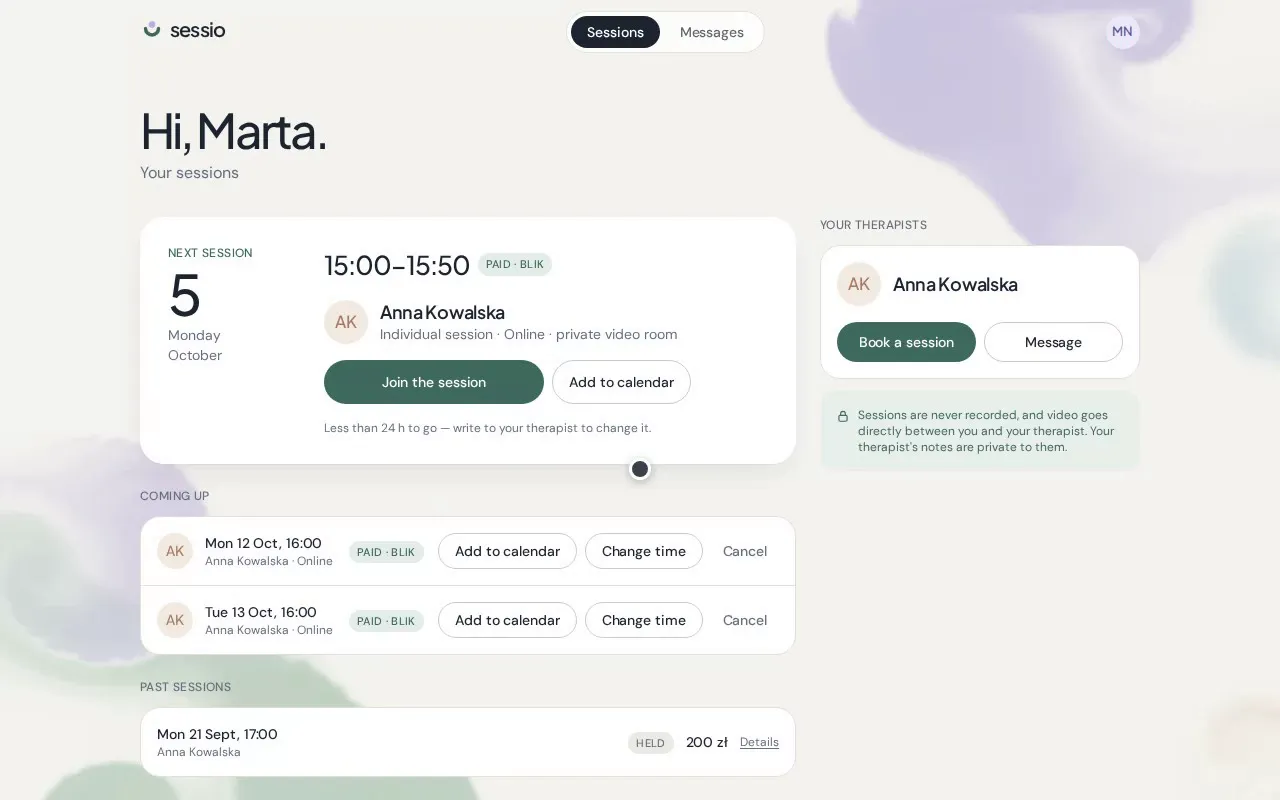
Sign in with Google or with the email you booked with. You’ll see every upcoming session and how to join it, change the time inside your therapist’s cancellation window, and write to them directly.
No account is needed to book — the portal is there when you want it, in Polish, Ukrainian or English.
Try the demo client portalWhat we promise you
- Sessions are never recorded. Video goes directly between you and your therapist, encrypted.
- Your details are stored in the EU and used only by your therapist, for your sessions.
- Sessio never sells data and never uses your information to train AI.
- Your therapist decides what goes in your record. You can ask to see it, as Polish law allows.
If you need help now
Sessio is not an emergency service.
If you are in danger or thinking about ending your life, please don’t wait for a session or a reply to a message.
Guides for clients
 0:39
0:39The client portal: see, move and message
What your clients see when they sign in: their sessions, a self-service way to change the time, and a direct line to you.
 2 min read
Joining a video session
For clients: how to join your online session from a phone or a laptop, with nothing to install.

01Do I need an account to book?
No. You pick a time, leave your name and email, and prepay. If you'd like to see your sessions, move one or write to your therapist later, you can sign in to the client portal with Google or with the same email.
02How do I join an online session?
Open the link from your confirmation email, calendar invite or day-before reminder. The Join button unlocks 10 minutes before the session and works in the browser — there's nothing to install.
03Can I change the time of my session?
Yes, inside your therapist's cancellation window. Sign in to the client portal, open the session and choose Change time — you'll see your therapist's free times.
04Who reads my messages?
Your therapist. A simple assistant may answer practical questions — prices, free times, how sessions work — from your therapist's settings. Anything personal waits for your therapist.
05What if I'm in crisis?
Sessio is not an emergency service. If you are in danger, call 112. In Poland you can also call 116 123 (adults) or 116 111 (children and young people), free and around the clock.